
When your business apps suddenly stop sharing data, customer records go missing, and sales workflows freeze, you might be facing a hidden technical roadblock. Salesforce API limits are crucial for any growing company, as they dictate the communication between your external software and Salesforce’s CRM. If app connections make a lot of requests in a short time, Salesforce stops the traffic to ensure that its servers remain stable. This results in lost data syncs, frustrated teams and lost money. Reliable salesforce integration services come in helpful to identify these traffic jams in good time. Constant monitoring and optimization of how your systems communicate can halt errors before they impede your business operations.
This guide will show you how Salesforce API limits work, why errors occur, and practical ways to prevent integration failures. According to Salesforce’s Connectivity Benchmark Report, 80% of respondents say integration challenges are slowing down their digital transformation efforts, highlighting the need for effective API management and reliable integrations.
What Are Salesforce API Limits?
Salesforce has strict API limits and salesforce usage caps in place to prevent its shared cloud environment from being overwhelmed by usage. Any external application that reads, creates, or updates a record in your CRM will send an API call. The total number of calls is not reset at midnight, and Salesforce records each call. The number of user licenses you have determines your daily allowance, depending on your Salesforce edition (Enterprise or Unlimited). When your connected tools use up these salesforce API calls, Salesforce temporarily stops accepting any new calls, causing your automated business processes to stop abruptly until old calls expire from the 24-hour time window.
Common Causes of Salesforce API Limit Errors
✦ Excessive API Requests
The apps that are connected to Salesforce frequently poll Salesforce every few seconds to see if anything has changed, consuming your quota. A proficient salesforce integration company will implement more intelligent triggers rather than nagging polling, so you will not be losing any calls on the count of empty checks.
✦ Inefficient Data Synchronisation
Syncing all of your customers’ records every hour, but not changed ones, wastes thousands of calls. Uncontrolled batch jobs will also result in big spikes which will overuse your API daily salesforce limit.
✦ Multiple Third-Party Integrations
If these marketing tools, ERP systems and customized apps are all using one CRM without coordination, their traffic can easily overload salesforce api limits.
✦ Poorly Optimised API Queries
Depending on loading records, one at a time in a loop, instead of hundreds at a time, not only increases the number of calls you’re making but will also cause Salesforce API call limits.
✦ Missing API Monitoring
In the absence of active tracking and automatic alerts, teams are only notified of growing usage when integrations suddenly crash at midday.
✦ Uncontrolled Retry Mechanisms
If the integration has an integration problem, and makes the same request hundreds of times per minute, it establishes a “retry loop” that eats up your API limits in salesforce.
Also Read: Salesforce Integration Cost in 2026: A Complete Pricing Guide
How Salesforce API Limits Affect Business Integrations
If you go over your Salesforce api limits, you may cause issues in your business operations because data flow will be affected between Salesforce and other applications. It may result in CRM synchronisation delays, missed ERP integrations, and disrupted marketing automation processes. Outdated customer information, lack of reports, and missing transactions can also be a challenge for sales and support teams. Due to this, IT teams waste more time on resolving the failed API calls, data entry, and integration maintenance, which leads to higher operational expenses.
Types of Salesforce API Limits You Should Know
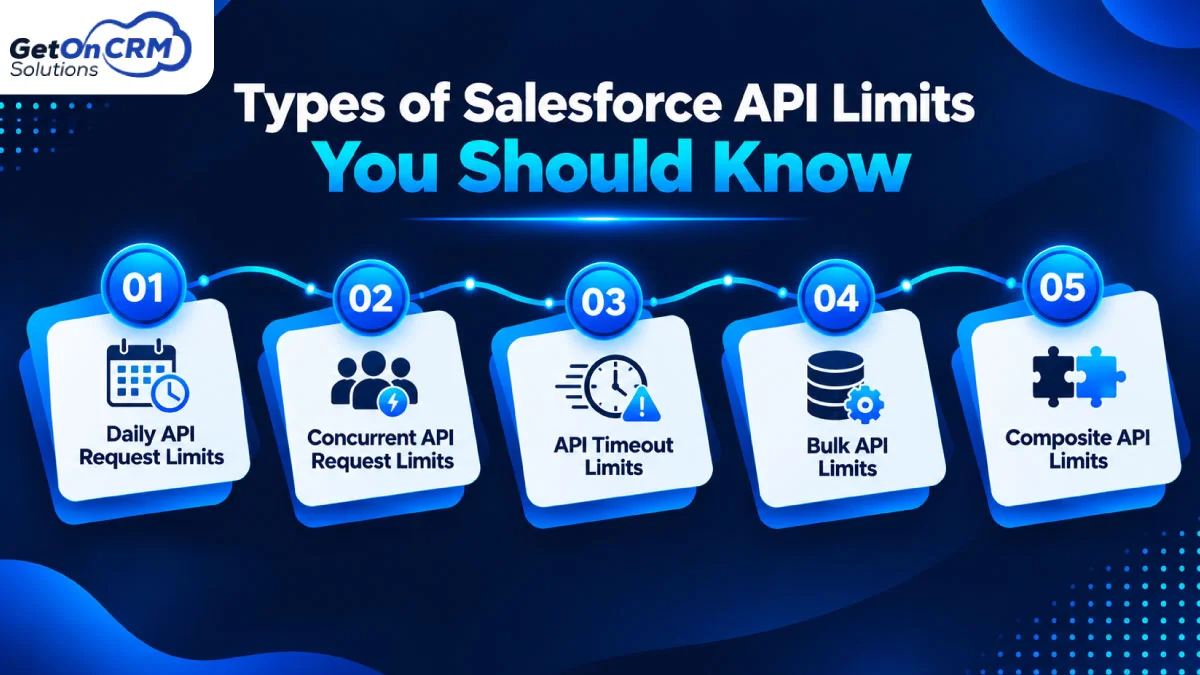
⮩ Daily API Request Limits
Your organization receives a shared pool of API limits salesforce daily across a rolling 24-hour period. All connected apps are served from this single bucket, so if one app is poorly built, it will use up the company’s daily allotment.
⮩ Concurrent API Request Limits
Salesforce allows only a limited number of long-running API requests (those taking more than 20 seconds) to run simultaneously. Typically, Enterprise and Unlimited editions support 25 concurrent requests. Salesforce integration company can help optimize API usage and prevent these restrictions from slowing down multiple active integrations.
⮩ API Timeout Limits
Each API call includes a maximum execution time which is typically 10 minutes for a standard API call and 2 minutes for an SOQL query. Slow, complex queries to the database will fail without returning any information.
⮩ Bulk API Limits
For moving large volumes of data, Bulk API works in batches. To avoid excessive data transfers and slowing down Salesforce, there is a limit on the number of batches that can be submitted in 24 hours, typically around 15,000 batches.
⮩ Composite API Limits
Multiple requests can be combined in one call to reduce bandwidth usage with Composite API. There are restrictions on composite calls in Salesforce, though: up to 25 subrequests per composite call, with a maximum of five of these being query operations.
How to Prevent Salesforce API Limit Integration Failures
✦ Monitor Salesforce API Usage
Monitor usage regularly to detect any large increases in use as early as possible. When you work with professional salesforce integration services, your team can monitor usage patterns around-the-clock and prevent the runaway apps from crashing your system.
✦ Optimise API Requests
Take an audit of your processes and remove unnecessary calls. Make several small changes with one request and get back only the specific fields your external system actually requires.
✦ Use Bulk API for Large Data Operations
Avoid normal REST or SOAP calls to update thousands of records. Use Bulk API to process up to 10,000 records at a time, significantly cutting into your salesforce API call limits.
✦ Implement API Rate Limiting
Manage traffic through your middleware, instead of having apps firing their requests at Salesforce in bursts.
✦ Enable Smart Retry Mechanisms
Don’t fail to use exponential backoff: wait 2 seconds, 4 seconds, and then 8 seconds between retries.
✦ Use Incremental Data Synchronisation
Set up your sync jobs to sync in the records that were created or modified since the last sync run by using the Timestamp or SystemModstamp field.
✦ Implement Caching Strategies
Keep the static reference data (such as product catalogs or country codes) in the external app, which avoids having to query Salesforce for the same information time after time.
✦ Schedule Integration Workloads
Any heavy data syncs or non-urgent data syncs will run overnight or on the weekends, keeping them out of the way of user activity during the day and from hitting API limits salesforce daily.
Also Read: List of Salesforce Integration Partners in India for CRM, ERP, and Data Integration
How to Monitor Salesforce API Limits and Usage
⮩ Monitor API Usage in Salesforce Setup
Sign in to Salesforce, click on Setup, and search for System Overview in the Quick Find field. Check the API Usage panel to see how many requests you have made in the past 24 hours.
⮩ Check API Usage Through Salesforce REST API
The developers can access the capacity by making a call to /services/data/vXX.X/limits endpoint – returns real-time remaining counts for each limit type.
⮩ Identify High-Consumption Integrations
Perform the API Calls Made Within Last 7 Days report in Salesforce Classic or check Connected App using logs. Like a dedicated salesforce integration agency identifies traffic jams, competent salesforce integration pros can identify just which app is consuming your quota.
⮩ Set Up API Usage Alerts
In Setup, under API Usage Notifications, set up the internal notifications to notify administrators when their daily limits are reached, at 70% or 80%.
Salesforce API Integration Best Practices for Long-Term Reliability
To ensure the reliability of long-term integration, it is important to manage APIs proactively. Implement usage restrictions on connected applications and minimize unnecessary API calls with event-driven approaches, such as Platform Events and Change Data Capture (CDC). Use request queues for prioritizing important updates, keeping error logs, and running integration tests during peak loads. After system changes, check API consumption regularly, and schedule performance audits quarterly with salesforce integration experts to stay on top of business changing needs.
Ready to Optimise Your Salesforce Integrations?
Don’t find out about potential weaknesses in your CRM system when things go wrong. The first step is to review the data usage over the past 24 hours, discover apps that are noisy, and remove redundant data syncs for increased reliability in all departments. An expert Salesforce integration consultant can audit your structure and resolve internal traffic jams quickly should you need a custom-made plan to safeguard your info pipelines. If you are looking for a full-service salesforce integration company, a trusted salesforce integration agency or professional salesforce integration services, the right salesforce integration service will help your business grow without hitting a wall.