
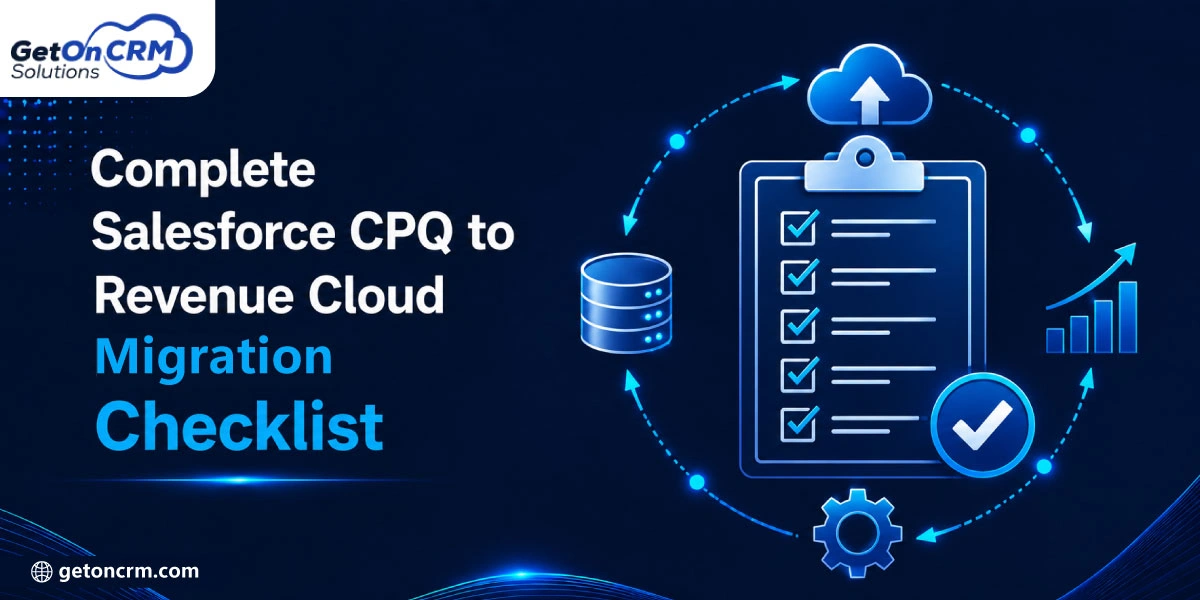
Salesforce CPQ to Revenue Cloud migration is basically an upgrade. Revenue Cloud is faster, integrated, and designed for advanced quote-to-cash workflows. Earlier, Salesforce CPQ was the backbone of quote-to-cash operations, but slowly the landscape has shifted. As Salesforce CPQ enters the end-of-state status, the innovation roadmap has moved completely to Revenue Cloud Advanced. Moving legacy CPQ to Salesforce Agentforce Revenue Cloud is an easy version of an upgrade. It’s basically an architectural transformation that unlocks headless APIs.
To simplify your transition, we’ve created a technical checklist for Agentforce Revenue Management. According to Salesforce’s State of Sales report, 83% of sales teams with AI saw revenue growth in the past year, highlighting the importance of a well-planned Revenue Cloud migration.
Understanding Salesforce CPQ and Revenue Cloud
✦ What Is Salesforce CPQ?
Sales teams can configure items, apply precise pricing, create expert quotations, and monitor approval workflows with Salesforce CPQ agentforce revenue management solutions. Through automation, it streamlines complex sales procedures, lowers human error, and speeds up quotation. In order to accommodate distinct pricing regulations, product bundles, and industry-specific sales requirements, many organizations also modify CPQ.
✦ What Is Salesforce Revenue Cloud?
Salesforce Revenue Cloud, agentforce revenue management services, manages the entire revenue lifecycle, going beyond standard CPQ. Subscription billing, usage-based pricing, contract management, renewals, recurring revenue models, and revenue automation are all supported. Revenue Cloud helps businesses increase operational effectiveness, provide better customer experiences, and facilitate scalable business growth by integrating sales and financial activities.
Key Differences Between Salesforce CPQ and Revenue Cloud
⇒ Product catalog management
Using preset product catalogs and bundles, Salesforce CPQ and Revenue Cloud concentrate on product configuration and accurate quotation generation. By supporting more advanced product structures, subscription services, usage-based services, and lifecycle management, Revenue Cloud broadens these possibilities.
This makes it possible for businesses to handle complicated product portfolios more effectively and quickly adjust to shifting consumer needs and business models.
⇒ Pricing and discounting
To make creating quotes easier, Salesforce CPQ offers guided selling, rule-based pricing, and discount approvals. With more advanced pricing techniques, subscription pricing, recurring billing models, and automated revenue computations, Revenue Cloud expands on these features. Companies are better equipped to handle complicated price situations while preserving profitability, uniformity, and compliance across various sales channelsContractContractt and subscription management
Revenue Cloud Salesforce Agentforce revenue management provides extensive contract lifecycle and subscription management features, whereas Salesforce CPQ mainly covers quote-to-contract procedures. From a single platform, it handles client entitlements, recurring billing, upgrades, downgrades, renewals, and revisions. It allows firms visibility over recurring revenue processes and long-term customer relationships.
⇒ Revenue lifecycle automation
By automating every step of the revenue lifecycle from product configuration and pricing to billing, invoicing, renewals, and revenue recognition, Revenue Cloud goes beyond simply providing quotes. Sales processes and quotation generation are the primary areas of focus for CPQ to Revenue Cloud migration consulting. End-to-end automation lowers manual labor, boosts operational effectiveness, and enables businesses to generate income more quickly and accurately.
⇒ Scalability and flexibility
While Salesforce Agentforce Revenue Cloud is designed for companies with changing revenue models and growing operational complexity, Salesforce CPQ efficiently supports classic sales processes. It provides enterprise-level automation, multi-product portfolios, worldwide pricing, and increased scalability for subscription organizations. Because of this flexibility, companies can accommodate future expansion without having to deal with major platform constraints or a lot of customization.
Also Read: AI-Driven Revenue Cloud Automation: The Next Frontier for Enterprises
Why a Salesforce CPQ to Revenue Cloud Migration Checklist Is Essential
✦ Reduces migration risks and implementation challenges
Before implementation starts, a Salesforce CPQ to Revenue Cloud migration services checklist assists businesses in identifying possible hazards. It offers precise instructions for each stage of the migration, minimizing unexpected issues, preventing expensive delays, and guaranteeing that technical aspects are properly managed. Adhering to a methodical checklist enhances project visibility, coordination, and the migration’s overall success.
✦ Ensures critical business processes are properly managed
Quoting, pricing, contract management, approvals, invoicing, and renewals are just a few of the crucial business activities that are guaranteed to run smoothly during the move thanks to a systematic migration checklist for Agentforce revenue management services. It ensures business continuity prior to, during, and following deployment by validating workflows, minimizing operational disruptions, and preserving data accuracy.
✦ Provides a structured approach for planning, execution, and optimization
Planning, execution, testing, deployment, and post-go-live optimization are all clearly outlined in a migration checklist. It establishes roles, monitors development, and guarantees that each migration task is finished in the proper sequence. This methodical strategy boosts long-term Revenue Cloud success, decreases errors, and increases project efficiency.
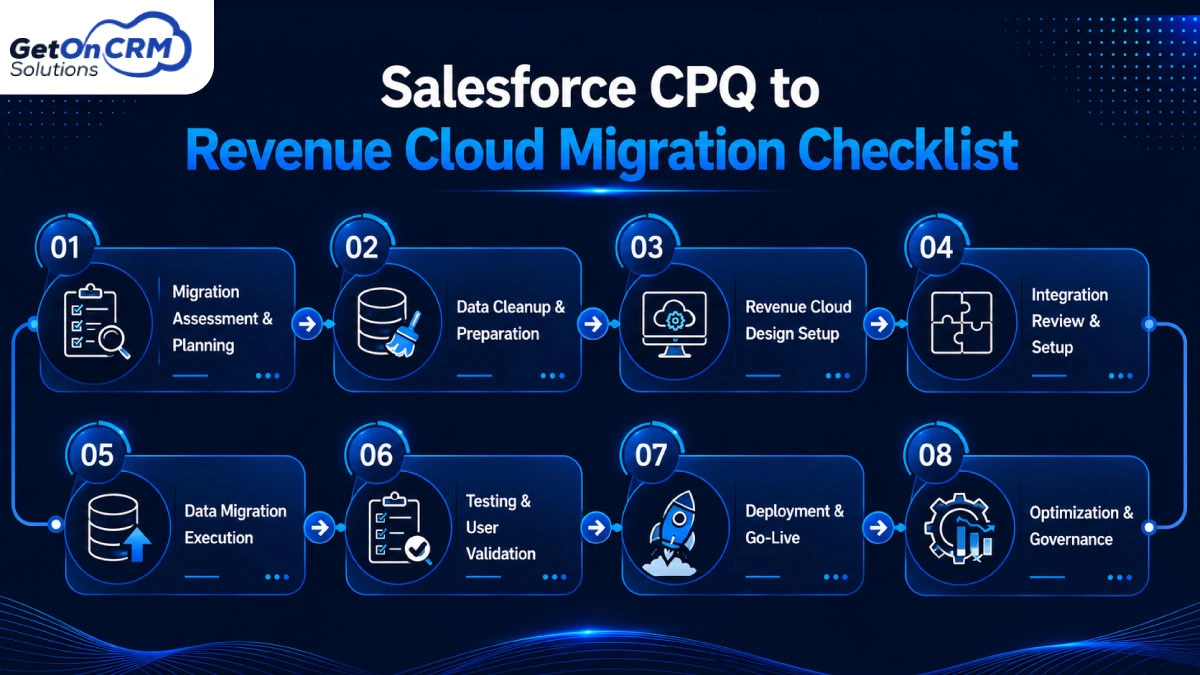
Salesforce CPQ to Revenue Cloud Migration Checklist
⇒ Phase 1: Migration Assessment & Planning
A thorough evaluation of your current CPQ environment is the first step in a successful Salesforce Revenue Cloud CPQ to Revenue Cloud transfer. To find dependencies and any migration issues, examine product configurations, pricing policies, approval procedures, quotation templates, custom objects, and third-party integrations. Whether your goals are to streamline revenue processes, support subscription billing, or enhance automation, clearly describe them.
Determine the stakeholders from operations, finance, IT, and sales and set quantifiable success criteria. Make a thorough migration plan that includes project phases, deadlines, roles, milestones, and risk-reduction techniques. A solid basis for a seamless and effective transition is created by careful preparation, which lowers implementation risks, avoids unforeseen delays, and guarantees that each team is aware of its role throughout the migration process.
⇒ Phase 2: Data Cleanup & Preparation
A CPQ to revenue cloud migration implementation’s success is directly impacted by data quality. Examine all Salesforce CPQ data, including products, price books, quotations, contracts, customer information, and configuration rules, prior to starting the migration. To reduce unnecessary data transfer, eliminate duplicate records. To increase data consistency, standardize naming conventions and verify required fields.
Next, make sure that relationships and dependencies are maintained by mapping current CPQ objects to their matching Revenue Cloud objects. Establish migration guidelines for price data, active contracts, and historical records while developing validation procedures to find anomalies prior to migration. Revenue Cloud can provide reliable pricing, quoting, invoicing, and revenue management capabilities right away with a well-prepared dataset, which also lowers migration errors and increases reporting accuracy.
⇒ Phase 3: Revenue Cloud Design Setup
After data preparation is finished, set up Revenue Cloud to work with the sales and revenue procedures of your company. To enable scalable product hierarchies, bundles, subscription services, and pricing structures, redesign the product catalog. Based on business needs, set up pricing policies, discount schemes, approval procedures, and product eligibility standards. When appropriate, automate the processes for creating quotes, managing contracts, renewals, revisions, and billing.
To make sure staff members have the proper access to private client and financial data, review user roles, permission sets, and security controls. Workflows that are well-designed minimize manual labor, increase sales efficiency, and provide a consistent customer experience while guaranteeing that Revenue Cloud can accommodate future business expansion without requiring major reconfiguration.
⇒ Phase 4: Integration Review & Setup
Integration planning is a crucial migration stage since Revenue Cloud frequently interacts with several enterprise platforms. Examine how Salesforce CPQ Revenue Cloud is now integrated with systems including ERP, CRM, finance, tax engines, payment gateways, document creation platforms, and customer support apps. Determine which middleware, data transformation logic, authentication techniques, and APIs need to be updated in order to enable Revenue Cloud.
Verify data flow between linked systems to make sure that, upon migration, prices, orders, invoices, contracts, and customer data stay in sync. Examine dependency mappings and find issues that can cause business processes to stop. After Revenue Cloud takes over as the main revenue management platform, a comprehensive integration evaluation helps avoid data discrepancies, reduces downtime, and guarantees that business operations continue to run smoothly.
⇒ Phase 5: Data Migration Execution
Use migration tools and validated processes to carry out the move after planning and preparation. In compliance with the predetermined migration sequence, migrate quotes, contracts, subscriptions, customer data, and associated configuration data into Revenue Cloud. To ensure reporting accuracy and business continuity, maintain links between records.
Maintain data validation reports during the migration process to spot any missing records, broken references, or formatting problems. To prevent more serious issues downstream, fix errors right away before moving on to the next migration phases. During the transfer to Revenue Cloud, careful execution minimizes operational disruptions and guarantees that vital sales and revenue data is maintained.
⇒ Phase 6: Testing & User Validation
Prior to production deployment, extensive testing guarantees Revenue Cloud operates as expected. Functional testing should be carried out for all important business activities, such as product configuration, quote preparation, pricing calculations, approvals, contract production, renewals, amendments, invoicing, and reporting. Make sure that connections with ERP, finance, payment, and external systems reliably and accurately communicate data.
Validate record accuracy by comparing the migrated data with the original CPQ environment. To verify that workflows satisfy actual business needs, do User Acceptance Testing (UAT) with business users from operations, sales, finance, and customer support. Prioritize fixes, record issues found, and retest until all crucial scenarios are successfully completed. Extensive validation boosts user confidence and drastically lowers post-deployment problems.
⇒ Phase 7: Deployment & Go-Live
Moving Revenue Cloud into the production environment with the least amount of disturbance to business operations is the main goal of the deployment phase. Create a thorough go-live checklist that addresses rollback strategies, training materials, user communication, backup protocols, production setup, and system access. Before granting users access, carry out the last migration of transactional data and confirm its successful conclusion.
Throughout the initial launch phase, keep a close eye on system performance, integrations, pricing calculations, quote generation, and billing procedures. Create a specialized support staff to limit operating downtime and promptly address problems. Throughout deployment, keep stakeholders informed about developments to preserve openness and trust. Organizations may make a seamless transition while preserving customer satisfaction and company continuity with a well-managed go-live process.
⇒ Phase 8: Optimization & Governance
After deployment, migration continues. Revenue Cloud continues to provide long-term company value thanks to ongoing optimization. Keep an eye on important metrics including quotation processing speed, pricing accuracy, system performance, user adoption, revenue cycle efficiency, and automation efficacy. To find potential for automation and workflow enhancements, get input from business users.
To preserve system integrity, establish governance policies that address security, compliance, change management, release management, data quality, and configuration standards. As organizational demands change, schedule routine audits to examine integrations, pricing policies, product catalogs, and business procedures. Continuous oversight and optimization enhance return on investment, boost operational effectiveness, and guarantee that Revenue Cloud stays in line with evolving revenue management needs and future business expansion.
Common Salesforce CPQ to Revenue Cloud Migration Challenges
✦ Complex CPQ Customization
Salesforce agentforce revenue management cloud systems with distinct pricing policies, approval workflows, custom objects, and connectors are highly customized in many businesses. These customizations may need to be redesigned or reconfigured because they are frequently unable to be moved straight into Revenue Cloud.
Implementation risks can be decreased by identifying unsupported features, streamlining complex logic, and recording dependencies prior to migration. While utilizing Revenue Cloud’s cutting-edge architecture and automation capabilities, a thorough evaluation guarantees that crucial business operations continue to operate.
✦ Data Migration Issues
After implementation, migrating incomplete or erroneous data might lead to serious issues. Pricing accuracy and reporting may be impacted by duplicate products, inconsistent client records, and missing contract information. Businesses should properly map their Salesforce CPQ data to Revenue Cloud objects and clean, validate, and standardize it before migrating. Conducting numerous validation checks and reconciliation tasks lowers migration errors, enhances data quality, and guarantees users can depend on correct information right away.
✦ Integration Compatibility Problems
Revenue Cloud frequently establishes connections with third-party business tools, payment gateways, ERP systems, finance platforms, and CRM apps. Updates to middleware, data mapping, authentication techniques, and APIs may be necessary for current Salesforce CPQ interfaces. Operational disruptions and problems with data synchronization may result from failing to check these dependencies. Before deployment, extensive integration testing guarantees that linked systems accurately communicate data and continue to support crucial business activities.
✦ Business Process Alignment
Businesses may need to change their current contract management, sales, quoting, and billing procedures in order to take advantage of Revenue Cloud’s new features. Companies that use historical processes should assess if their present procedures complement Revenue Cloud’s automation capabilities and best practices.
Redefining approvals, pricing strategies, subscription management, or revenue recognition workflows are some examples of process enhancements. Increased productivity, less manual labor, and long-term scalability across revenue processes are all ensured by aligning business operations with the platform.
✦ User Adoption & Change Management
If users have difficulty embracing the new platform, even the most successful migration may fail. Before going live, employees must comprehend new workflows, automation features, and system capabilities. Employees can move to Revenue Cloud with confidence if they receive role-based training, clear documentation, practical experience, and continuous support. Improving acceptance and lowering resistance to change are further benefits of promoting stakeholder involvement throughout the relocation process. Productivity, user satisfaction, and the migration project’s overall performance all rise with effective change management.
Also Read: Revenue Cloud for Manufacturing: A Complete Implementation Guide
Best Practices for a Successful Migration
⇒ Start with a detailed discovery phase
A thorough discovery phase is the first step in a successful CPQ to revenue cloud migration consultancy. Evaluate the items, pricing policies, approvals, customizations, integrations, and business processes in your current CPQ environment. Prior to deployment, determine any possible risks, business requirements, and technical dependencies.
Establishing clear project objectives, defining migration priorities, and developing realistic timetables are all made easier by involving both technical and business teams at this phase. Careful preparation minimizes unexpected challenges and creates the framework for a more seamless transition.
⇒ Clean and simplify CPQ configuration before migration
Examine your Salesforce CPQ configuration before moving to get rid of duplicate entries and unnecessary customizations. After installation, system efficiency is enhanced, and migration difficulty is decreased by streamlining the current environment. Mapping to Revenue Cloud is also made simpler by standardizing pricing models, product architectures, and approval procedures. Organizations can fully utilize Revenue Cloud’s cutting-edge capabilities and automation features with a clean setup, which also reduces migration problems and implementation time.
⇒ Involve business stakeholders early
Business stakeholders must actively participate in the implementation process for migration projects to be successful. Teams from sales, finance, operations, customer service, and IT should work together to prioritize important features, validate workflows, and define business needs. Involving stakeholders early on guarantees that Revenue Cloud is set up to support actual business activities rather than theoretical ones. Frequent communication also helps in managing expectations, lowering resistance to change, and enhancing decision-making, all of which lead to a solution that is more valuable to the company.
⇒ Test every migration stage
Instead of just testing before go-live, testing should be done at every stage of the migration. After every implementation, verify data migration, product configurations, pricing computations, quote creation, approvals, integrations, and reporting. To find problems early and lower deployment risks, perform various tests. Frequent testing increases data accuracy, verifies that business procedures operate as intended, and gives assurance that Revenue Cloud is prepared for production without interfering with regular business operations.
⇒ Prioritize user training and adoption
A major element of successful migration is user adoption. Before the system goes live, staff members should receive role-specific training on Revenue Cloud features, improved workflows, and automation capabilities. Employees may adjust more quickly and confidently with the help of hands-on training, user manuals, and continuous support. Identifying usability enhancements and further training requirements are another benefit of encouraging feedback during deployment. Productivity is increased, operational errors are decreased, and the total return on the Revenue Cloud investment is raised by well-trained users.
⇒ Create a long-term Revenue Cloud governance plan
Your experience with Revenue Cloud doesn’t end with migration. To handle upcoming improvements, security guidelines, data quality, user permissions, release upgrades, and configuration modifications, establish a governance framework. Establish ownership duties and conduct routine system evaluations to make sure the platform continues to satisfy changing company needs. Maintaining operational effectiveness and system dependability is supported by tracking performance data and continuously improving workflows. Strong governance promotes long-term scalability, compliance, and sustainable business growth while safeguarding your investment.
Ready to Simplify Your Salesforce CPQ to Revenue Cloud Migration?
Migration from Salesforce CPQ to Revenue Cloud Advanced is a technical challenge. It’s a strategic approach to keep the firm competitive. When a business relies on legacy systems, it might miss out on the AI revolution. Revenue Cloud is the foundation for CPQ-to-Revenue Cloud migration services that help businesses by automatically generating quotes, tracking customers, and recommending the next deals. To streamline your migration, hire a professional Agentforce revenue management solutions provider and build a structured roadmap.