
Enterprises migrate their Salesforce environments to avoid legacy limitations, improve scalability, integrations, and support evolving business demands. However, Salesforce transformation does more than transfer data among the systems. Salesforce reports that 26% of firm data is considered untrustworthy by data and analytics leaders, highlighting why data quality is a major priority during Salesforce transformation.
CIOs should align migration goals with broader business goals while managing data quality, system dependencies, integrations, security, customization, testing, and user adoption. Selection of ideal Salesforce migration services allows firms to measure these complexities, develop a structured migration strategy, and limit operational disruptions.
CIOs must determine which legacy data & customizations are required before moving them into the targeted environment. Early planning, governance, testing, and risk management are necessary for safeguarding business continuity and verifying that migration delivers measurable value. Read the Salesforce data migration challenges below and the best practices to resolve them.
Why Salesforce Migration Requires CIO-Level Planning
CIO-level planning is necessary because Salesforce data migration may impact enterprise data, applications, integrations, and crucial business processes. Migration often involves complicated legacy environments, integrated applications, customizations, and significant amounts of business data.
CIOs have to assess how these elements work together and determine how migration might affect user productivity, security, compliance, and day-to-day operations. Before migrating, enterprise environments may also have out-of-date systems and technical dependencies that need to be carefully evaluated.
Organizations can set clear goals, recognize possible hazards, assign suitable resources, and develop testing and rollback plans with the help of an early Salesforce migration strategy. A methodical approach facilitates a more seamless transition to the Salesforce environment, minimizes operational disruption, and protects data integrity.
When Should Enterprises Consider Salesforce Migration?
✦ Legacy CRM limitations
When an organization’s current CRM is unable to meet changing business requirements, they should consider moving to a Salesforce migration process. Productivity and growth may be hampered by outdated functionality, restricted scalability, poor usability, and maintenance issues.
✦ Growing data complexity
Legacy systems can be challenging to manage due to rapidly growing data volumes, inconsistent structures, duplicate records, and intricate data relationships. Enterprise data organization and access can be made more scalable through migration.
✦ Integration challenges
An existing CRM may no longer be able to support business requirements if there are frequent integration failures, disconnected applications, and limited API capabilities. The migration of Salesforce can contribute to the development of a more interconnected technology ecosystem.
✦ Performance issues
Employee productivity can be negatively impacted by slow system performance, inconsistent reporting, long processing times, and frequent technical problems. When the current platform is unable to reliably provide the necessary performance, migration should be taken into consideration.
✦ Need for better automation
When current systems offer limited automation capabilities, businesses may think about migrating. Salesforce migration services provider can help businesses decrease manual labor and improve overall productivity by supporting automated workflows, intelligent processes, and streamlined operations.
✦ Business expansion requirements
New needs for scalability, integrations, users, and procedures may arise from business expansion. Businesses can create a flexible CRM foundation that can accommodate shifting operational and customer demands with the help of a Salesforce data migration consultant.
Also Read: Salesforce Data Migration Partner in USA for Secure Data Transfer
What Should CIOs Evaluate Before Starting Salesforce Migration?
◈ Existing Salesforce architecture
The current Salesforce architecture, including its objects, customizations, workflows, automation, applications, and technical dependencies, should be examined by CIOs. This evaluation helps in identifying unnecessary complexity and areas that need to be redesigned prior to migration.
◈ Data quality and volume
Assess the current data’s volume, quality, structure, and business relevance. Determining cleansing requirements, migration priorities, and suitable migration techniques is made easier by identifying duplicates, incomplete records, out-of-date information, and large datasets.
◈ System dependencies
A Salesforce migration services provider should determine how Salesforce, databases, legacy apps, APIs, and business processes are interdependent. Teams can plan migration sequencing, avoid service interruptions, and guarantee that vital data flows continue to function by having a thorough understanding of these relationships.
◈ Security requirements
Before moving sensitive corporate data, security requirements should be assessed. To reduce security and regulatory risks, CIOs should examine access controls, encryption, privacy requirements, compliance obligations, audit capabilities, and data governance policies.
◈ Integration complexity
Check every integration that connects Salesforce to third-party systems, ERP, finance, marketing, customer support, and analytics. It is possible to avoid integration failures and post-migration operational disruptions by being aware of APIs, data dependencies, and synchronization requirements.
◈ Migration budget and timeline
Based on data volume, complexity, integrations, customizations, testing, and business requirements, CIOs should set reasonable migration budgets and schedules. Adding backup resources makes it easier to handle unexpected technical problems without sacrificing the quality or timeliness of the migration.
Key Salesforce Migration Challenges CIOs Should Address
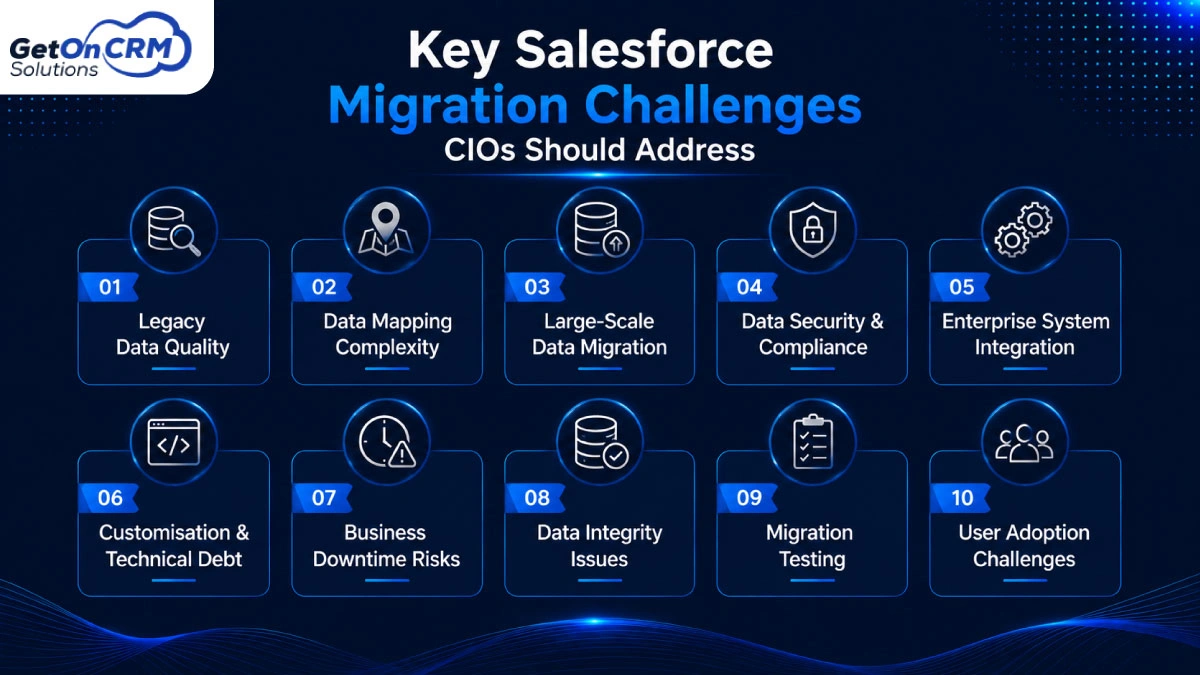
1. Legacy Data Quality
One of the first issues CIOs should deal with before beginning a Salesforce CRM migration is the quality of legacy data. Enterprise systems frequently gather unnecessary, out-of-date, incomplete, or inconsistent records over time. Additionally, different departments may adhere to different naming conventions, data formats, and storage practices, which complicates the migration process.
Inaccurate data transfer into Salesforce can be made even more likely by unstructured legacy data. Therefore, before starting a migration, companies should perform a thorough data assessment. This involves finding duplicate records, eliminating outdated data, standardizing formats, completing crucial data gaps, and confirming the accuracy of the data.
To guarantee that only accurate and relevant data enters the new Salesforce environment, it can be helpful to establish clear data quality rules. Additionally, a systematic cleaning procedure increases user productivity and strengthens the basis for Salesforce automation and analytics.
2. Data Mapping Complexity
When businesses transfer data from several legacy systems into Salesforce, data mapping can get complicated. In order to decide how each data element should be transferred, CIOs must first identify the source and target objects. System-to-system variations in field names, formats, values, or structures necessitate well-defined transformation rules.
To maintain business context, relationships between accounts, contacts, opportunities, cases, and other records must also be accurately mapped. Inaccurate relationships, missing data, or unusable records following migration are all possible outcomes of poor mapping.
A Salesforce data migration consultant should clearly define transformation, validation, and default-value rules and document field-level mappings in order to lower these risks. Prior to implementation, mapping should be reviewed with business stakeholders. Mapping gaps can be found early by conducting test migrations and validating sample datasets, which enables teams to fix problems prior to the complete migration.
3. Large-Scale Data Migration
Millions of records may be involved in large-scale Salesforce migrations, so CIOs must take performance and processing efficiency into account. Migrating everything at once can lead to problems with system performance, higher failure rates, and longer downtime. Therefore, before starting a migration, businesses should identify and prioritize business-critical datasets.
Then, depending on objects, dependencies, business functions, or geographical areas, data can be separated into manageable batches. Because related records might need to be loaded in a particular order to maintain relationships, migration sequencing is equally crucial. In order to minimize disruption, teams should also decide on suitable migration windows.
Throughout each batch, tracking migration performance, error rates, and processing times provides significant insights. Organizations can move large amounts of data effectively while preserving business continuity and lowering operational risks with a carefully planned large-scale migration.
4. Data Security & Compliance
Throughout a Salesforce migration, data security and regulatory compliance should continue to be top priorities, especially for organizations handling sensitive customer, financial, employee, or business data. CIOs must decide how to safeguard data during its extraction, transfer, transformation, storage, and loading into Salesforce.
Only authorized Salesforce data migration partners should be able to view or modify sensitive data thanks to appropriate access controls. When defining migration procedures, organizations must also take relevant industry and data protection regulations into account. Businesses can monitor data movement, user activity, and changes made during the migration by keeping audit trails.
Roles, security measures, retention standards, and approval procedures should all be spelled out in detail in governance policies. Additional ways to lessen exposure include controlled environments, encryption, secure transfer methods, and frequent access reviews. Organizations can reduce regulatory risks, prevent data breaches, and strengthen governance throughout the Salesforce environment by addressing security and compliance requirements early.
5. Enterprise System Integration
Integration is another significant migration challenge because Salesforce rarely functions as a stand-alone business platform. Salesforce may need to be connected to data warehouses, customer support apps, marketing platforms, ERP systems, finance systems, and other third-party apps. Modifications to Salesforce fields, objects, APIs, or data structures may have an impact on these interconnected systems.
Therefore, before migrating, CIOs should assess all current integrations and determine which dependencies might be affected. To help teams understand how information will move between systems after migration, integration requirements should be documented alongside data mappings.
A Salesforce data migration consultant can assist with determining suitable migration strategies, evaluating integration dependencies, and coordinating technical requirements across systems. Before going live, integration testing should be done to make sure that workflows, APIs, data synchronization, and downstream procedures are still operating as intended. This strategy promotes a more seamless transition and lowers integration failures.
6. Customization & Technical Debt
Extensive customizations that have accumulated over many years are frequently found in legacy Salesforce environments. Custom objects, fields, workflows, Apex code, applications, integrations, and automation rules that are no longer necessary or consistent with existing business procedures are examples of these.
Simply moving all of the customizations to the new environment can result in more complexity and unnecessary technical debt. Therefore, before migrating, CIOs should thoroughly examine the current Salesforce architecture. Every custom component should be evaluated according to its use, future relevance, technical state, and business value.
Essential functionality should be updated or redesigned, while legacy processes and unnecessary customizations should be removed when appropriate. Concerns about compatibility or performance may also be found by examining Apex code and dependent applications. Organizations can create a cleaner Salesforce environment instead of replicating legacy complexity.
7. Business Downtime Risks
Business downtime is a significant concern during Salesforce migration because employees may depend on Salesforce for sales, customer service, marketing, reporting, and other everyday operations. CIOs should establish a reasonable downtime threshold and base the migration plan on business continuity requirements.
Phased migration techniques can minimize disruption by moving data and functionality gradually rather than all at once. Prior to execution, teams should establish reliable backup procedures and ensure that critical data can be restored in the event of unexpected issues. A well-documented rollback strategy is equally important for handling migration failures.
In order for business teams to plan appropriately, they should also be informed about expected modifications, temporary system limitations, and migration schedules. Prior to the production migration, operational barriers can be identified by conducting mock migrations. While facilitating a smooth transition to the new Salesforce environment, careful planning and coordination can greatly lower the risks of downtime.
8. Data Integrity Issues
Ensuring the accuracy, detail, and usability of migrated Salesforce records requires maintaining data integrity. Relationships between accounts, contacts, opportunities, cases, and other objects may be impacted during migration if dependencies are missed or records are moved incorrectly. CIOs should make sure that historical data, record relationships, and ownership structures are maintained in accordance with business needs.
To ensure that related records are migrated in the right order, object dependencies should be recorded prior to data loading. Teams should systematically align the source and target environments after migration. Comparing record counts, verifying important fields, examining past records, and verifying relationships are a few examples of this.
Business users can confirm important datasets from an operational standpoint, and automated validation rules can assist in finding gaps at scale. Salesforce users can trust the migrated data and carry on with business operations without major data-related disruptions thanks to a robust data integrity strategy.
9. Migration Testing
Before Salesforce is used as the main business environment, extensive testing is necessary to find migration problems. CIOs should make sure that testing addresses both business needs and technical functionality. Records, fields, relationships, and historical data can all be verified through data validation testing.
Salesforce’s proper communication with ERP, finance, marketing, support, and other linked platforms should be confirmed through integration testing. While performance testing helps in evaluating how the new environment manages anticipated workloads, functional testing can ascertain whether business processes and automation continue to function as intended.
Permissions, access controls, and sensitive data handling should all be verified by security testing. In the end, business users can verify that the migrated system supports their daily workflows through user acceptance testing. Whenever possible, representative datasets and realistic scenarios should be used for testing. Post-migration problems can be greatly decreased by recording defects, assigning ownership, and finishing retesting prior to deployment.
10. User Adoption Challenges
If the team isn’t ready to use the new environment efficiently, even a technically proven Salesforce migration may encounter difficulties. Users may become confused and resistant when interfaces, workflows, processes, reports, or responsibilities are changed. Therefore, long before the migration goes live, CIOs should start managing change and communicating.
Workers should be aware of the reasons behind the migration, the changes that will occur, and how those changes will impact their roles. Instead of overloading users with information, role-specific training can assist them in learning the features and workflows that are most pertinent to their duties.
Additionally, organizations should offer accessible support during the transition, process guides, FAQs, and updated support documentation. Gathering user feedback after launch can highlight workflow difficulties, training gaps, and usability problems that might not have surfaced during testing. Adoption, productivity, and the long-term return on the Salesforce investment can all be improved with ongoing feedback and focused assistance.
Common Salesforce Migration Mistakes CIOs Should Avoid
✦ Migrating unnecessary legacy data
Complexity, storage needs, and processing time may all increase if all historical records are migrated. Business-critical data should be identified by CIOs, and data that is irrelevant and has minimal operational value should be eliminated.
✦ Skipping data cleansing
Long-term issues with data quality may arise from transferring incomplete or duplicate records into Salesforce. Accurate reporting, system usability, and general trust in business data are all improved by thorough cleaning prior to migration.
✦ Underestimating integration complexity
Serious operational disruptions can result from ignoring dependencies between Salesforce and related systems. To make sure integrated apps continue to operate properly after migration, CIOs should evaluate APIs, data flows, and integration dependencies.
✦ Replicating outdated customizations
Transferring all legacy customizations to the new Salesforce environment may result in unnecessary technical debt. CIOs should assess custom code, workflows, and objects and keep only those modifications that continue to support business needs.
✦ Inadequate testing
Data errors, integration failures, and workflow problems may go unnoticed until after launch due to inadequate testing. Before production deployment, thorough testing is performed by Salesforce data migration experts.
✦ Ignoring compliance requirements
Sensitive information may be put at unnecessary risk if organizational and regulatory compliance requirements are neglected. Throughout the migration process, CIOs should take into account security controls, access policies, audit requirements, and relevant data protection standards.
✦ Failing to prepare rollback plans
Migration failures can result in long-term disruption and data loss without a solid rollback plan. CIOs should create procedures for restoring the prior environment when needed, maintain verified backups, and specify rollback criteria.
How CIOs Can Prepare for a Successful Salesforce Migration
◈ Assess the Existing Technology Landscape
CIOs should evaluate the current technology environment to comprehend applications, integrations, data sources, and technical dependencies prior to migration. Potential migration risks can be identified by examining data quality and recording current customizations. Before migration planning starts, teams can use this assessment to find dependencies, out-of-date systems, and integration requirements.
◈ Define Clear Migration Goals and Scope
CIOs should specify the goals of the Salesforce migration and set clear business objectives. Prioritize important business processes and decide which data needs to be moved. In addition to preventing unnecessary scope expansion and guaranteeing alignment between technical and business teams, setting deadlines, milestones, roles, and measurable outcomes helps maintain the migration’s focus.
◈ Build a Strong Data Governance Framework
Throughout migration, a robust data governance framework helps in preserving data security, quality, and accountability. CIOs should specify who owns the data, set quality standards, and decide who can access or change the data. To ensure that migrated data stays accurate, secure, and compliant, clear security policies and validation procedures should be set up.
◈ Develop a Phased Migration Strategy
Instead of finishing everything at once, a phased migration strategy allows organizations to move data and workloads through manageable stages. Before moving forward, CIOs should prioritize high-value workloads, test each stage, and assess the outcomes. This strategy lowers the overall risks connected with large-scale migration, minimizes operational disruption, and helps in the early identification of problems.
◈ Establish Testing, Backup and Rollback Plans
Before starting a migration, CIOs should create thorough testing, backup, and rollback plans. Teams can safely validate data and business processes with the help of dedicated test environments. Clear rollback criteria should specify when the migration needs to be reversed, and reliable backups should be kept up to date. Assessments of readiness can verify whether teams and systems are ready for launch.
Also Read: Best Salesforce Data Migration Tools for Businesses in 2026
Salesforce Migration Readiness Checklist for CIOs
✦ Migration goals and scope defined
Clearly define migration goals, expected outcomes, timelines and scope before execution. Identify which data, apps and processes should move to Salesforce to manage focus, control costs and align stakeholders.
✦ Legacy systems and data assessed
Determine legacy platforms, applications, database and existing data before migration. Identify outdated records, dependencies, duplicates and technical limitations to evaluate what should be cleansed, archived and migrated.
✦ Security and compliance requirements documented
Privacy, document security, access control, retention and compliance demands before migration. Establish clear policies for safeguarding data through transfer, extraction, transformation, storage and loading activities.
✦ Integrations and customizations reviewed
Review custom objects, Salesforce integrations, apps, APIs, workflows and automation prior to migration. Evaluate dependencies and outdated components to avoid compatibility errors and avoid transferring unnecessary technical debt.
✦ Testing, backup and rollback plans prepared
Prepare comprehensive QA procedures, rollback strategies, and verified backups before migration. Define recovery process, validation criteria to minimize breakdowns and respond effectively to unexpected migration breakdowns.
✦ User training and post-migration support planned
Prepare users for changes through role-specific training, documentation, and communication. Establish post-migration support channels to address queries, resolve workflow errors, gather feedback and encourage successful Salesforce adoption.
Ready to Build a Low-Risk Salesforce Migration Strategy?
Salesforce migration service should be considered as an enterprise transformation rather than a simple data transfer. CIOs must evaluate data quality, integration dependencies, technical debt, security demands, and user adoption before migration starts.
Collaborating with a skilled Salesforce data migration partner can help the firm identify risks, establish governance, and develop a structured migration roadmap. The well-planned strategy must include data cleansing, phased migration, comprehensive QA, backup, and the migration process.
By addressing these Salesforce Migration Challenges early, the business can limit operational errors while developing a scalable Salesforce environment. This strong foundation supports advanced analytics, future automation, and rising business expectations.